
Introduction
Filling the CLAT 2027 application form correctly is a crucial step for every law aspirant aiming for admission into National Law Universities (NLUs). Even a small mistake during registration—such as incorrect personal details, document upload errors, or payment failure—can lead to application rejection or problems during counselling.
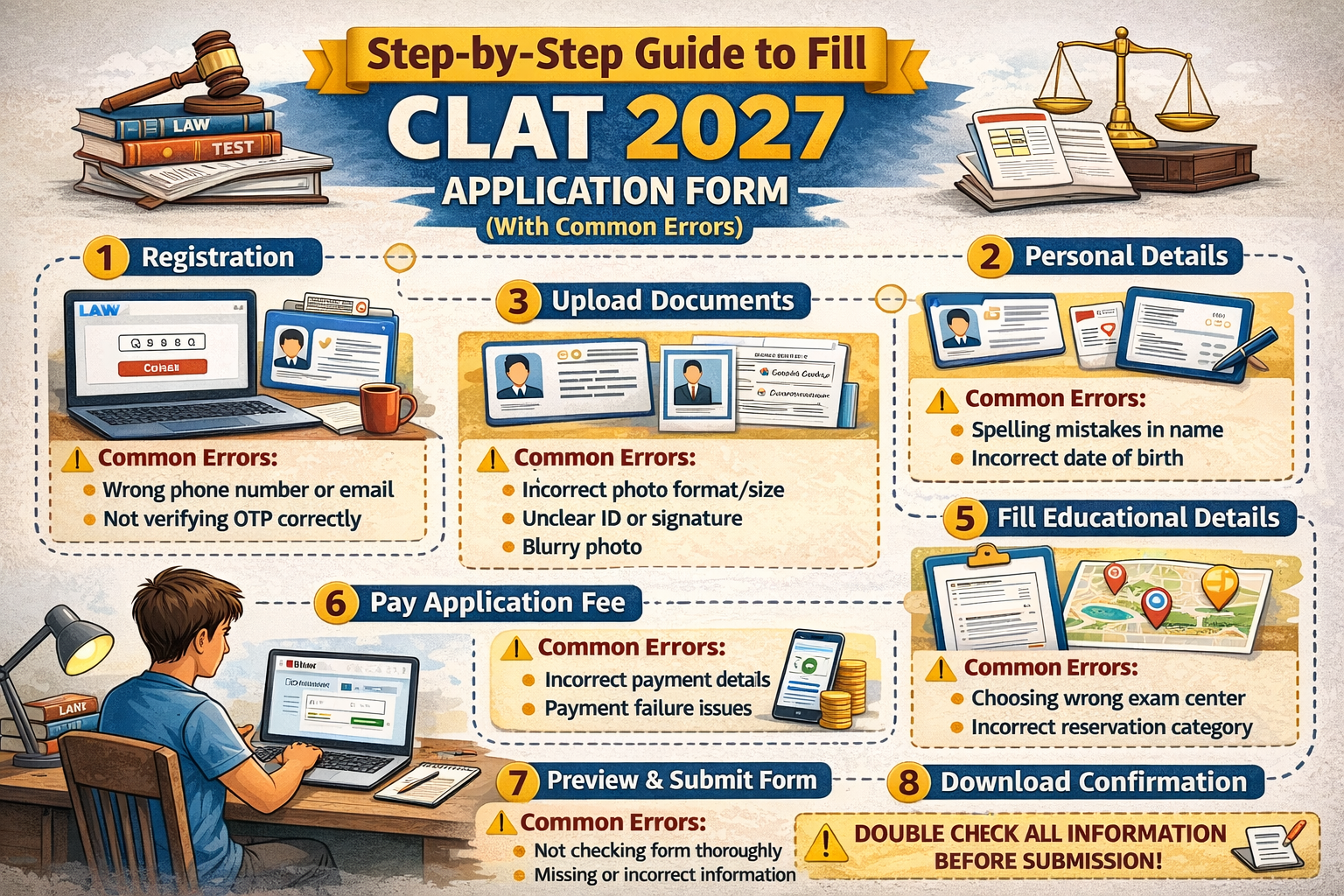
This article provides a complete step-by-step guide to filling the CLAT 2027 application form, along with a list of common errors to avoid, ensuring a smooth and error-free registration process.
📌 CLAT 2027 Application Form – Overview
Exam Name: Common Law Admission Test (CLAT) 2027
Mode of Application: Online
Eligible Candidates: CLAT UG aspirants (Class 12 passed or appearing)
Application Stages: Registration → Form Filling → Document Upload → Fee Payment → Final Submission
📝 Documents Required Before Filling CLAT 2027 Application Form
Keep the following ready before starting:
Valid email ID and mobile number
Recent passport-size photograph
Scanned signature
Class 10 & Class 12 details
Category certificate (if applicable)
PwD certificate (if applicable)
Net banking / debit card / credit card details
📌 Having documents ready avoids last-minute errors.
🧾 Step-by-Step Process to Fill CLAT 2027 Application Form
🔹 Step 1: Online Registration
Visit the official CLAT portal
Click on New Registration
Enter:
Full name (as per Class 10 certificate)
Mobile number
Email ID
Create password
📌 Use a valid email ID and mobile number for OTP verification.
🔹 Step 2: Login to Candidate Dashboard
Login using:
Registered mobile number/email
Password
You will be redirected to the CLAT 2027 application dashboard.
🔹 Step 3: Fill Personal Details
Enter details carefully:
Full name
Date of birth
Gender
Category (General / SC / ST / OBC / EWS / PwD)
Nationality
Parent/guardian details
📌 All details must match official documents.
🔹 Step 4: Enter Educational Qualification Details
Provide:
Class 10 board, year, and percentage
Class 12 board (passed/appearing)
Year of passing/appearing
Qualifying examination status
📌 Appearing candidates must select “Result Awaited.”
🔹 Step 5: Select Exam Details
Choose CLAT UG 2027
Select preferred test city (multiple options may be available)
📌 Exam centers are allotted on a first-come, first-served basis.
🔹 Step 6: Upload Documents
Upload scanned copies of:
| Document | Format | Size (Approx.) |
|---|---|---|
| Photograph | JPG/JPEG | As specified |
| Signature | JPG/JPEG | As specified |
| Category Certificate | PDF/JPG | If applicable |
| PwD Certificate | PDF/JPG | If applicable |
📌 Ensure clarity and correct orientation of images.
🔹 Step 7: Review the Application Form
Before proceeding to payment:
Recheck all personal details
Verify category and exam details
Confirm document uploads
📌 Corrections are limited after final submission.
🔹 Step 8: Pay CLAT 2027 Application Fee
Pay through online mode:
Debit card
Credit card
Net banking
Expected Application Fee
General / OBC / EWS: Higher fee
SC / ST / PwD: Concessional fee
📌 Fee once paid is non-refundable.
🔹 Step 9: Final Submission & Confirmation
Submit the application form
Download:
Application confirmation page
Fee receipt
📌 Save and print copies for future reference.
⚠️ Common Errors to Avoid While Filling CLAT 2027 Application Form
❌ Incorrect Personal Details
Name spelling mismatch
Wrong date of birth
Incorrect category selection
❌ Uploading Invalid Documents
Blurred photograph or signature
Wrong file format or size
Uploading old or unclear images
❌ Payment-Related Mistakes
Closing browser during payment
Not checking payment confirmation
Paying fee multiple times
❌ Choosing Wrong Exam Category
Selecting PG instead of UG
Incorrect reservation category
❌ Late Application Submission
Waiting till the last day
Facing server issues
✅ Tips for Error-Free CLAT 2027 Application
Fill form in one sitting if possible
Use a laptop/desktop instead of mobile
Double-check every field
Apply early to get preferred exam center
Keep screenshots of each step
📈 Why Accurate CLAT 2027 Application Matters
Avoids rejection during counselling
Prevents document verification issues
Ensures smooth exam center allotment
Reduces last-minute stress
❓ Frequently Asked Questions (FAQs)
Q1. Can I edit the CLAT 2027 application form after submission?
Limited corrections may be allowed during the correction window, if provided.
Q2. Is the CLAT 2027 application fee refundable?
No, the application fee is non-refundable.
Q3. Can I apply for CLAT 2027 using a mobile phone?
Yes, but it is recommended to use a laptop or desktop to avoid errors.
Q4. What happens if my payment fails?
Check your bank statement. If the amount is deducted without confirmation, contact helpdesk support.
Q5. Can Class 12 appearing students fill the CLAT 2027 application form?
Yes, they are eligible, provided they pass Class 12 before admission.
Q6. Is it mandatory to upload category certificates during application?
Yes, if you are claiming reservation benefits.
Q7. Will mistakes in the application form affect admission?
Yes, incorrect details can lead to disqualification during counselling.
Conclusion
Filling the CLAT 2027 application form carefully is just as important as preparing for the exam itself. By following this step-by-step guide and avoiding common mistakes, candidates can ensure a smooth registration process and focus fully on preparation. Apply early, verify details thoroughly, and keep all documents ready to avoid unnecessary complications.